Showing posts with label virus. Show all posts

Friday, October 24, 2008

How to Enable/Disable Auto Paly in Removable Drive

Open Group Policy Screen ( To get to the Group Policy configuration screen , go to Start Menu \ Run and type in: gpedit.msc )

You will see the Group Policy window. You should select Administrative Templates \ System in the tree view:

You will see an item "Turn off Autoplay"


Double click the item, and set the radio button to Enabled, and change the "Turn off Autoplay on" to All Drives.

Always Disable AutoRun property for all drive, it will reduce virus attack from removable media

Tuesday, October 21, 2008

AVG Anti-Virus 8.0 Virus Definition Update Error

Problem:
When updating AVG 8.0 virus definition
Receiving an error "Invalid Update Control CTF File".

Solution:
You need to remove the .CTF temp files in C:\Documents and Settings\All Users\Application Data\Avg8\update\download…. Dont delete all the .bin files in there unless you want to re-run all updates since your original installation. Only remove the avginfo files that end with .ctf.

There were two .CTF files (avginfoavi.ctf and avginfowin.ctf) in that folder.

Note: The Application Data folder is hidden by default. You need to enable Windows Explorer to show hidden files in order to view the Application Data folder. Alternately, type the above folder path in the Start, Run dialog and press {ENTER} to launch the folder.

Friday, September 5, 2008

Online File Scan - Free Virus Detection

If you have a suspicious file, submit it online . Find the threat behind it, the service is free,

Following antivirus are used for scanning your file

AhnLabV3, AntiVir, Authentium, Avast, AVG, BitDefender, CATQuickHeal,

ClamAV, DrWeb, eSafe, eTrustVet, Ewido, FProt, Fortinet, GData, Ikarus, K7AntiVirus,

Kaspersky, McAfee, MicrosoftNOD32v2, Norman, Panda, PCTools, Rising, Sophos, Sunbelt,

Symantec, TheHacker, TrendMicro, VBA32, ViRobot, VirusBuster, WebwasherGateway, etc etc

http://virusscan.jotti.org/

Sunday, April 20, 2008

Worm.Win32.Netsky Removal Process

Worm.Win32.Netsky is a new rogue anti-spyware program trojan, which is part of a fake malicious software engineered by Internet hackers. Worm.Win32.Netsky-related anti-spyware is a fake anti-spyware program. Do NOT purchase Worm.Win32.Netsky related spyware under any circumstances since it is a fake anti-spyware software.

The following process will help you remove it from your system easily and safely.

Worm.Win32.Netsky Manual Removal Process:

1. Click on the Start Menu button, then click on the Control Panel option, and then Double-click on the Add or Remove Programs icon.
2. Locate Worm.Win32.Netsky and double-click on it to uninstall Worm.Win32.Netsky. Follow the screen step-by-step screen instructions to complete uninstallation of Worm.Win32.Netsky.
3. Restart the computer.
4. When it has completed uninstalling you can close Add or Remove Programs and your Control Panel.
5. Close all programs.
6. Stop Worm.Win32.Netsky process. If you do not know how to stop a running process, click here to read more.
7. Delete the following infected files from your system.
EasyAV.exe
EasyAV
secound_document4.pif
e-mail3.pif
approved_file7.pif

Remove Worm.Win32.Netsky with SmithfraudFix:
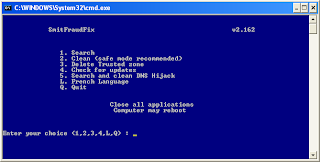

1. Download SmithfraudFix tool and save it to your desktop.
2. Reboot your computer in Safe Mode (before the Windows icon appears, tap the F8 key continually)
3. Double-click SmitfraudFix.exe
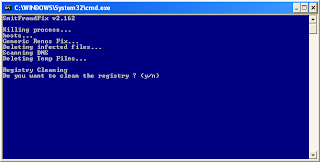
4 Select 2 and hit Enter to delete infect files.
5. You will be prompted: Do you want to clean the registry ? answer Y (yes) and hit Enter in order to remove the Desktop background and clean registry keys associated with the infection.
6. The tool will now check if wininet.dll is infected. You may be prompted to replace the infected file (if found): Replace infected file ? answer Y (yes) and hit Enter to restore a clean file.
7. A reboot may be needed to finish the cleaning process. The report can be found at the root of the system drive, usually at C:\rapport.txt

Restore Trusted and Restricted site zone
1. To restore Trusted and Restricted site zone, select 3 and hit Enter.
2. You will be prompted: Restore Trusted Zone ? answer Y (yes) and hit Enter to delete trusted zone.

Search
1. Select 1 and hit Enter to create a report of the infected files. The report can be found at the root of the system drive, usually at C:\rapport.tx

(Disclaimers: These instructions are free and not guaranteed to work. Please use it at your own risks. We are not responsible for any damages.)

Thursday, March 20, 2008

Remove Win32 AutoRun Worm-Funny UST scandal

Win32 AutoRun Worm-Funny UST scandal worm create a hidden background service (xmss.exe). It copied itself on Local disk and Windows Directory (%Windir%). Terminated “Windows Task Manager”, Windows Command Prompt (DOS-Prompt) & crashed System Internal Process Explorer (procxp.exe).

Files created by this worm
* x:autorun.inf
* x:xmss.exe
* x:Funny UST Scandal.avi.exe
* %Windir%\autorun.inf
* %Windir%\xmss.exe
* %Windir%\Funny UST Scandal.avi.exe

How to remove
1. Disabled System Restore for Temporary - KB 264887
2. Boot Windows in Safe Mode - KB 315222

3. In Windows Safe Mode, Open Windows Registry Editor

Windows Start > Run > Regedit
Browse to the following registry settings
HKEY_LOCAL_MACHINE\SOFTWARE\Microsoft\WindowsNT\CurrentVersion\Winlogon\Shell
Replace the value 'explorer.exe, xmss.exe' with 'exporer.exe'

4. Delete all the following files

* C\autorun.inf
* C\xmss.exe
* C\Funny UST Scandal.avi.exe
* X:\autorun.inf
* X:\xmss.exe
* X:\Funny UST Scandal.avi.exe
* %Windir%\autorun.inf
* %Windir%\xmss.exe
* %Windir%\Funny UST Scandal.avi.exe

5. Clean All Windows Temporary Files
6. Restart the Windows

** edit registry values with false data can damage your OS **

Friday, January 18, 2008

Common Virus Folders and Files

Virus favorite files and folders in windows

%System%\IEXPLORE.EXE,
%System%\EXPLORE.EXE,
%Windir%\rundll32.exe,
%System%\userinit32.exe,
%system32%,
X:\Documents and Settings\XXXX\Local Settings\Temp,
autorun.inf,
desktop.ini

some virus have similar windows file names, like scvhost.exe, rundl32.exe, crss.exe, lsuss.exe etc

Saturday, December 22, 2007

win32.NetSky - I WORM

win32.NetSky is an email worm virus, the description of this i-worm is mentioned in my old blog, in this post
u can find the variations of this i-worm

Email-Worm.Win32.NetSky.a to
Email-Worm.Win32.NetSky.z ,
Email-Worm.Win32.NetSky.ab
Email-Worm.Win32.NetSky.ac
Email-Worm.Win32.NetSky.ad
Email-Worm.Win32.NetSky.ae
Email-Worm.Win32.NetSky.af
Email-Worm.Win32.NetSky.ag
Email-Worm.Win32.NetSky.ah
Email-Worm.Win32.NetSky.ai
Email-Worm.Win32.NetSky.aj
Email-Worm.Win32.NetSky.ak
Email-Worm.Win32.NetSky.al
Email-Worm.Win32.NetSky.am
Email-Worm.Win32.NetSky.an
Email-Worm.Win32.NetSky.ao
Email-Worm.Win32.NetSky.ap
Email-Worm.Win32.NetSky.aq
Email-Worm.Win32.NetSky.ar
Email-Worm.Win32.NetSky.as
Email-Worm.Win32.NetSky.at
Email-Worm.Win32.NetSky.au
Email-Worm.Win32.NetSky.av
Email-Worm.Win32.NetSky.aw
Email-Worm.Win32.NetSky.gen
Email-Worm.Win32.NetSky.q.dam
Email-Worm.Win32.NetSky.dao
Email-Worm.Win32.NetSky.dam


Kaspersky inadvertently quarantines Windows Explorer

HOT News on Zdnet.com

Kaspersky inadvertently quarantines Windows Explorer

Windows Explorer, one of the most crucial components of Microsoft's operating system, was quarantined earlier this week after being falsely identified as malicious code by an antivirus company.

Monday, November 19, 2007

Virus W32/RJump.worm - Ravmon.exe

Device Virus, Ravmon.exe
i created this article bcoz of my friends computer infected by this virus

W32/Rjump.worm is a worm written using the Python scripting language and was converted into a windows portable executable file using the Py2Exe tool. It attempts to spread by coping itself to mapped and removable storage drives and also opens a backdoor on an infected system.

this virus block some administrative windows functions like

block taskmanager
block regedit.exe
disable folder option
disable command prompt
disable run, etc
if you found these problems in your pc , it because of ravmon.exe - Virus W32/RJump.worm

this is not a dangers virus, but it also crate a log file that contains the port number on which its backdoor component listens.

Characteristics of W32/RJump.worm - Ravmon.exe
---------------------------------------------------

it creates a copy of itself into the windows system directory
%Windir%\RAVMON.EXE
RavMonLog ( log file)

Create a registry update on
HKEY_LOCAL_MACHINE\Software\Microsoft\Windows\CurrentVersion\Run
"RavAV" = "%Windir%\RAVMON.EXE"

create a copy of files in all drives
autorun.inf --used to autorun the worm when the drive is accessed
msvcr71.dll -- Clean Microsoft Visual Studio dll file
ravmon.exe -- copy of the worm

The contents of the autorun.inf are as follows:
[AutoRun]
open=RavMonE.exe e
shellexecute=RavMonE.exe e
shell\Auto\command=RavMonE.exe e
shell=Auto

Reseting to default setting by these Registry values

to enable task manager
Hive: HKEY_CURRENT_USER
Key:
Software\Microsoft\Windows\CurrentVersion\Policies\System
Name:
DisableTaskMgr
Type:
REG_DWORD
Value:
1=Enable

to enable regedit.exe
Start -> Run -> gpedit.msc -> User Configuration -> Administrative Templates -> System -> Prevent access to registry editing tools -> Right Click Properties -> Disabled

to enable Folder Otion
User Key: [HKEY_CURRENT_USER\Software\Microsoft\Windows\CurrentVersion\Policies\
Explorer]

System Key:

Explorer]
Value Name:
NoFolderOptions
Data Type:
REG_DWORD (DWORD Value)
Value Data:
(0 = show options, 1 = hide options) [

to enable run
Registry Key: HKEY_LOCAL_MACHINE\Software\Microsoft\Windows\CurrentVersion\ Policies\Explorer
Create a DWORD value for each Run function that will be disabled.

Modify/Create the Value Name [DisableLocalMachineRun] according to the Value Data listed below.
Data Type: REG_DWORD [Dword Value] // Value Name: DisableLocalMachineRun
Data Type: REG_DWORD [Dword Value] // Value Name: DisableLocalMachineRunOnce
Data Type: REG_DWORD [Dword Value] // Value Name: DisableCurrentUserRun
Data Type: REG_DWORD [Dword Value] // Value Name: DisableCurrentUserRunOnce

Setting for Value Data: [0 = Disabled / 1 = Enabled]

Stop the virus
---------------------
* stop the service having the path %path% ravmon.exe
* stop the ravmon.exe from task manger
* delete ravmon.exe from the pc
* remove the startup registry value from HKEY_LOCAL_MACHINE\Software\Microsoft\Windows\CurrentVersion\Run, (don't delete the path only * * delete the ravmon.exe regisry value)
* delete files autorun.inf and ravmon.exe from all drive

Monday, November 5, 2007

Email Virus - Top rated I Worm

Win32.Netsky


Win32:Netsky the top rated email worm in last 2 month, mail with a attachment file .pif .

if u run the attachment file, u will get a message like "The file could not be opened". and the virus make a copy of itself in pc, named 'service.exe' .

Win32:Netsky Mail details

Message header (chosen at random from the list below)

Approved
Hello
Hi
Important
My details
Re: Approved
Re: Hello
Re: Hi
Re: Important
Re: My details
Re: Request
Re: Thanks you!
Re: Your details
Re: Your document
Re: Your information
Request
Thank you!
Your details
Your document
Your information

subject (chosen at random from the list below) :
fake
hello
hi
information
read it immediately
something for you
stolen
unknown
warning

Attachment File name (chosen at random from the list below) :
aboutyou
attachment
bill
concert
creditcard
details
dinner
disco
doc
document
final
found
friend
information
jokes
location
mail2
mails
me
message
misc
msg
nomoney
note
object
part2
party
posting
product
ps
ranking
release
shower
story
stuff
swimmingpool
talk
textfile
topseller
website

Delete Win32:Netsky
to delete the virus, goto control panel -> administrative tools -> Services
and find the service with executable path "%Windir%\services.exe -serv"

stop the service disable it, and remove the file from your hard disk.

the virus will create a registry update on the path
[HKLM\Software\Microsoft\Windows\CurrentVersion\Run]
"EastAV"="%windir%\EastAV.exe"
delete the key from registry, for that run regedit.exe ( click on start -> run and type regedit)
goto the path
[HKLM\Software\Microsoft\Windows\CurrentVersion\Run] and remove only the key "EastAv"

or you can download 'Win32:Netsky' fix tools from http://www.kaspersky.com
Download Free Virus Fix

Wednesday, October 31, 2007

Tips for protecting your system from virus

Tips for protecting your system from virus

* disable AutoRun In CD Drive
* do not download any executable file from your mail. like .com, .bat, .exe etc
* avoid clicking on executable file having default icon(icon of cmd.exe)
* disable system restore
* keep an eye on temp folders and system restore point because these are the favorite place of trojens and small virus
* do not open mail from unknown sender
* check you startup list at every logon
* do not give write permission in sharing ( in Network)
* keep an eye on process list, if any specious process found check it.
* disconnect internet when not in use, because intruder attacks are high when you are in idle state

these tips will only protect your system from small virus and trojens, use an antivirus for protecting from high risk virus and a firewall, update your virus definition Frequently

Virus Type
  • Boot viruses
  • Program viruses
  • Multipartite viruses
  • Stealth viruses
  • Polymorphic viruses
  • Macro Viruses
  • Active X
Trojen types
  • Downloader
  • Remote Access.
  • Email Sending
  • Data Destruction
  • Proxy Trojan
  • FTP Trojan
  • security software disabler
  • denial-of-service attack (DoS)
  • URL trojan