connect your USB stick to the pc and hold the shift key(to prevent auto running). hold the shift key a few minutes( depending upon your pc speed). click my computer and right click on the USB drive and click on explore(DONT DOUBLE CLICK ON THE DRIVE).
go to "Tool >> Folder Option >> View" click on "Show hidden files and folders" and uncheck the "Hide Protected operating system files "
click apply and ok.
If autorun virus exists, drive will contain a "autorun.inf" file. right click and open it in "Notepad".(DONT DOUBLE CLICK ON AUTORUN.INF).
in that file u can find a entry like,
"[autorun]
open = CDstart.exe" and some extra fields
Locate the executable (exe) file and delete it, and delete the "autorun.inf" file also.
Your USB Drive is Now Virus Free ( Autorun Virus).
if you get any Error message from the Explore while deleting the file, then the virus is infected on your computer also.
if you can detect the virus file in your pc then kill the process and delete the file and repeat the above steps. Otherwise use any antivirus to remove it.

Showing posts with label Email Virus. Show all posts
Showing posts with label Email Virus. Show all posts
Tuesday, August 12, 2008

Sunday, April 20, 2008
Worm.Win32.Netsky Removal Process
Worm.Win32.Netsky is a new rogue anti-spyware program trojan, which is part of a fake malicious software engineered by Internet hackers. Worm.Win32.Netsky-related anti-spyware is a fake anti-spyware program. Do NOT purchase Worm.Win32.Netsky related spyware under any circumstances since it is a fake anti-spyware software.
The following process will help you remove it from your system easily and safely.
Worm.Win32.Netsky Manual Removal Process:
1. Click on the Start Menu button, then click on the Control Panel option, and then Double-click on the Add or Remove Programs icon.
2. Locate Worm.Win32.Netsky and double-click on it to uninstall Worm.Win32.Netsky. Follow the screen step-by-step screen instructions to complete uninstallation of Worm.Win32.Netsky.
3. Restart the computer.
4. When it has completed uninstalling you can close Add or Remove Programs and your Control Panel.
5. Close all programs.
6. Stop Worm.Win32.Netsky process. If you do not know how to stop a running process, click here to read more.
7. Delete the following infected files from your system.
EasyAV.exe
EasyAV
secound_document4.pif
e-mail3.pif
approved_file7.pif
Remove Worm.Win32.Netsky with SmithfraudFix:
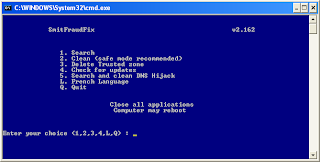
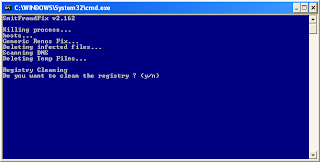
1. Download SmithfraudFix tool and save it to your desktop.
2. Reboot your computer in Safe Mode (before the Windows icon appears, tap the F8 key continually)
3. Double-click SmitfraudFix.exe
4 Select 2 and hit Enter to delete infect files.
5. You will be prompted: Do you want to clean the registry ? answer Y (yes) and hit Enter in order to remove the Desktop background and clean registry keys associated with the infection.
6. The tool will now check if wininet.dll is infected. You may be prompted to replace the infected file (if found): Replace infected file ? answer Y (yes) and hit Enter to restore a clean file.
7. A reboot may be needed to finish the cleaning process. The report can be found at the root of the system drive, usually at C:\rapport.txt
Restore Trusted and Restricted site zone
1. To restore Trusted and Restricted site zone, select 3 and hit Enter.
2. You will be prompted: Restore Trusted Zone ? answer Y (yes) and hit Enter to delete trusted zone.
Search
1. Select 1 and hit Enter to create a report of the infected files. The report can be found at the root of the system drive, usually at C:\rapport.tx
(Disclaimers: These instructions are free and not guaranteed to work. Please use it at your own risks. We are not responsible for any damages.)
The following process will help you remove it from your system easily and safely.
Worm.Win32.Netsky Manual Removal Process:
1. Click on the Start Menu button, then click on the Control Panel option, and then Double-click on the Add or Remove Programs icon.
2. Locate Worm.Win32.Netsky and double-click on it to uninstall Worm.Win32.Netsky. Follow the screen step-by-step screen instructions to complete uninstallation of Worm.Win32.Netsky.
3. Restart the computer.
4. When it has completed uninstalling you can close Add or Remove Programs and your Control Panel.
5. Close all programs.
6. Stop Worm.Win32.Netsky process. If you do not know how to stop a running process, click here to read more.
7. Delete the following infected files from your system.
EasyAV.exe
EasyAV
secound_document4.pif
e-mail3.pif
approved_file7.pif
Remove Worm.Win32.Netsky with SmithfraudFix:


1. Download SmithfraudFix tool and save it to your desktop.
2. Reboot your computer in Safe Mode (before the Windows icon appears, tap the F8 key continually)
3. Double-click SmitfraudFix.exe
4 Select 2 and hit Enter to delete infect files.
5. You will be prompted: Do you want to clean the registry ? answer Y (yes) and hit Enter in order to remove the Desktop background and clean registry keys associated with the infection.
6. The tool will now check if wininet.dll is infected. You may be prompted to replace the infected file (if found): Replace infected file ? answer Y (yes) and hit Enter to restore a clean file.
7. A reboot may be needed to finish the cleaning process. The report can be found at the root of the system drive, usually at C:\rapport.txt
Restore Trusted and Restricted site zone
1. To restore Trusted and Restricted site zone, select 3 and hit Enter.
2. You will be prompted: Restore Trusted Zone ? answer Y (yes) and hit Enter to delete trusted zone.
Search
1. Select 1 and hit Enter to create a report of the infected files. The report can be found at the root of the system drive, usually at C:\rapport.tx
(Disclaimers: These instructions are free and not guaranteed to work. Please use it at your own risks. We are not responsible for any damages.)
Tuesday, January 15, 2008
How to block Email Virus
how to block email virus
Email virus are found in attachments, always check your attachments before u open it
be careful while opening these file formats
and always download attachments mailed by known senders
if you are using any email client softwares like outlook, thunder bird etc
configure your anti virus for your email clients software and update your email software frequently .
Email virus are found in attachments, always check your attachments before u open it
be careful while opening these file formats
File Extension | File type |
|---|---|
| .ade | Microsoft Access project extension |
| .adp | Microsoft Access project |
| .bas | Microsoft Visual Basic class module |
| .bat | Batch file |
| .chm | Compiled HTML Help file |
| .cmd | Microsoft Windows NT Command Script |
| .com | Microsoft MS-DOS program |
| .cpl | Control Panel extension |
| .crt | Security certificate |
| .exe | Program |
| .hlp | Help file |
| .hta | HTML program |
| .inf | Setup Information |
| .ins | Internet Naming Service |
| .isp | Internet Communication settings |
| .js | JScript file |
| .jse | Jscript Encoded Script file |
| .lnk | Shortcut |
| .mda | Microsoft Access add-in program |
| .mdb | Microsoft Access program |
| .mde | Microsoft Access MDE database |
| .mdz | Microsoft Access wizard program |
| .msc | Microsoft Common Console Document |
| .msi | Microsoft Windows Installer package |
| .msp | Windows Installer patch |
| .mst | Visual Test source files |
| .pcd | Photo CD image or Microsoft Visual Test compiled script |
| .pif | Shortcut to MS-DOS program |
| .reg | Registration entries |
| .scr | Screen saver |
| .sct | Windows Script Component |
| .shs | Shell Scrap Object |
| .url | Internet shortcut |
| .vb | VBScript file |
| .vbe | VBScript Encoded Script file |
| .vbs | VBScript file |
| .wsc | Windows Script Component |
| .wsf | Windows Script file |
| .wsh | Windows Script Host Settings file |
and always download attachments mailed by known senders
if you are using any email client softwares like outlook, thunder bird etc
configure your anti virus for your email clients software and update your email software frequently .
Saturday, December 22, 2007
win32.NetSky - I WORM
win32.NetSky is an email worm virus, the description of this i-worm is mentioned in my old blog, in this post
u can find the variations of this i-worm
Email-Worm.Win32.NetSky.a to Email-Worm.Win32.NetSky.z ,
Email-Worm.Win32.NetSky.ab
Email-Worm.Win32.NetSky.ac
Email-Worm.Win32.NetSky.ad
Email-Worm.Win32.NetSky.ae
Email-Worm.Win32.NetSky.af
Email-Worm.Win32.NetSky.ag
Email-Worm.Win32.NetSky.ah
Email-Worm.Win32.NetSky.ai
Email-Worm.Win32.NetSky.aj
Email-Worm.Win32.NetSky.ak
Email-Worm.Win32.NetSky.al
Email-Worm.Win32.NetSky.am
Email-Worm.Win32.NetSky.an
Email-Worm.Win32.NetSky.ao
Email-Worm.Win32.NetSky.ap
Email-Worm.Win32.NetSky.aq
Email-Worm.Win32.NetSky.ar
Email-Worm.Win32.NetSky.as
Email-Worm.Win32.NetSky.at
Email-Worm.Win32.NetSky.au
Email-Worm.Win32.NetSky.av
Email-Worm.Win32.NetSky.aw
Email-Worm.Win32.NetSky.gen
Email-Worm.Win32.NetSky.q.dam
Email-Worm.Win32.NetSky.dao
Email-Worm.Win32.NetSky.dam
u can find the variations of this i-worm
Email-Worm.Win32.NetSky.a to Email-Worm.Win32.NetSky.z ,
Email-Worm.Win32.NetSky.ab
Email-Worm.Win32.NetSky.ac
Email-Worm.Win32.NetSky.ad
Email-Worm.Win32.NetSky.ae
Email-Worm.Win32.NetSky.af
Email-Worm.Win32.NetSky.ag
Email-Worm.Win32.NetSky.ah
Email-Worm.Win32.NetSky.ai
Email-Worm.Win32.NetSky.aj
Email-Worm.Win32.NetSky.ak
Email-Worm.Win32.NetSky.al
Email-Worm.Win32.NetSky.am
Email-Worm.Win32.NetSky.an
Email-Worm.Win32.NetSky.ao
Email-Worm.Win32.NetSky.ap
Email-Worm.Win32.NetSky.aq
Email-Worm.Win32.NetSky.ar
Email-Worm.Win32.NetSky.as
Email-Worm.Win32.NetSky.at
Email-Worm.Win32.NetSky.au
Email-Worm.Win32.NetSky.av
Email-Worm.Win32.NetSky.aw
Email-Worm.Win32.NetSky.gen
Email-Worm.Win32.NetSky.q.dam
Email-Worm.Win32.NetSky.dao
Email-Worm.Win32.NetSky.dam
Monday, November 5, 2007
Email Virus - Top rated I Worm
Win32.Netsky
Win32:Netsky the top rated email worm in last 2 month, mail with a attachment file .pif .
if u run the attachment file, u will get a message like "The file could not be opened". and the virus make a copy of itself in pc, named 'service.exe' .Win32:Netsky Mail details
Message header (chosen at random from the list below)
Approved
Hello
Hi
Important
My details
Re: Approved
Re: Hello
Re: Hi
Re: Important
Re: My details
Re: Request
Re: Thanks you!
Re: Your details
Re: Your document
Re: Your information
Request
Thank you!
Your details
Your document
Your information
subject (chosen at random from the list below) :
fake
hello
hi
information
read it immediately
something for you
stolen
unknown
warning
Attachment File name (chosen at random from the list below) :
aboutyou
attachment
bill
concert
creditcard
details
dinner
disco
doc
document
final
found
friend
information
jokes
location
mail2
mails
me
message
misc
msg
nomoney
note
object
part2
party
posting
product
ps
ranking
release
shower
story
stuff
swimmingpool
talk
textfile
topseller
website
Delete Win32:Netsky
to delete the virus, goto control panel -> administrative tools -> Services
and find the service with executable path "%Windir%\services.exe -serv"
stop the service disable it, and remove the file from your hard disk.
the virus will create a registry update on the path
[HKLM\Software\Microsoft\Windows\CurrentVersion\Run]delete the key from registry, for that run regedit.exe ( click on start -> run and type regedit)
"EastAV"="%windir%\EastAV.exe"
goto the path
[HKLM\Software\Microsoft\Windows\CurrentVersion\Run] and remove only the key "EastAv"

or you can download 'Win32:Netsky' fix tools from http://www.kaspersky.com
Download Free Virus Fix
Subscribe to:
Posts (Atom)